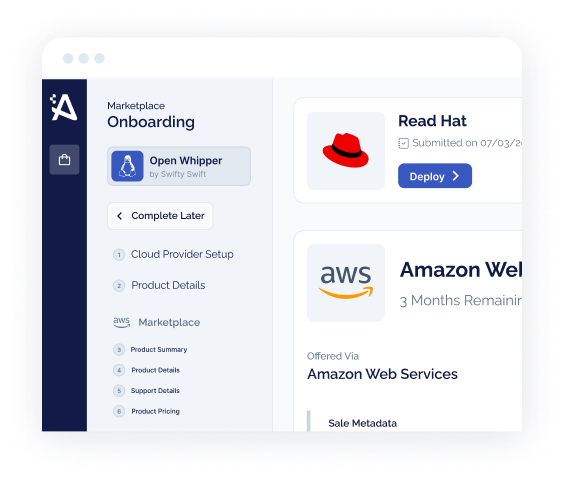




- Buy with AWS lets AWS Partners put an AWS Marketplace–powered purchase button on their own website. AWS announced it on December 4, 2024 (AWS Marketplace).
- Buyers browsing your site can find products “Available in AWS Marketplace,” request demos, start free trials, request custom pricing, then transact by logging in with their AWS account.
- Every purchase is still managed inside AWS Marketplace, so the buyer keeps consolidated AWS billing, centralized subscription management, and committed-spend drawdown — the reasons enterprise procurement prefers the channel.
- It is not a substitute for a transactable listing. You need a live AWS Marketplace product first; Buy with AWS is the discovery-to-checkout layer you bolt onto your marketing site.
A buyer lands on your website, reads a case study, and clicks to purchase — and the transaction runs through their AWS account instead of a credit-card form or a six-week procurement cycle. That is the promise of Buy with AWS, a feature AWS Marketplace announced on December 4, 2024 that lets AWS Partners bring an AWS Marketplace checkout onto their own sites. It closes the awkward gap between “interested on your website” and “transacting in the marketplace” — but only if you understand what it does, what it doesn’t, and what has to be true before the button works.
What Buy with AWS actually is
Until late 2024, the marketplace journey had a seam in it. A prospect discovered you on your website, but to buy through AWS Marketplace — the thing their procurement team actually wanted — they had to leave your site, go to the AWS Marketplace catalog, and find your listing again. Every extra hop is a chance to lose the deal. Buy with AWS removes that seam: per AWS, it is a feature that helps accelerate discovery and procurement on AWS Partners’ websites for products available in AWS Marketplace (AWS Marketplace, December 2024).
In practice, partners who sell or resell in AWS Marketplace can mark products as “Available in AWS Marketplace” on their own pages and add a Buy with AWS button. A visitor can request a demo, start a free trial, or request custom pricing, then click the button and complete the transaction by logging in to their AWS account. Crucially, AWS states that all purchases made through Buy with AWS are transacted and managed within AWS Marketplace — so the buyer still gets consolidated AWS billing, centralized subscription management, and access to cost optimization tools (AWS Marketplace, December 2024).
The number that explains the feature is the middle one: when nearly a fifth of enterprise software purchasing already runs through cloud marketplaces (IDC), the buy button on your own site is only as valuable as its ability to hand the buyer straight into that channel. Buy with AWS is AWS closing that loop for partners.
How the button works, end to end
The flow is deliberately short, because every step you remove between interest and purchase is a step a deal can’t stall on. Here is what happens from the buyer’s first click to a managed subscription.
A visitor browses your website and sees products flagged “Available in AWS Marketplace,” with the option to request a demo, start a free trial, or request custom pricing.
Instead of a bespoke checkout, the buyer clicks the Buy with AWS button, which routes them into the AWS Marketplace transaction flow for your product.
The buyer logs in to their AWS account to complete the purchase — the same account that holds their billing relationship and any committed spend.
AWS manages the transaction within AWS Marketplace, so the subscription, entitlement, and metering behave exactly as they would for any marketplace purchase.
Consolidated AWS billing, centralized subscription management, and cost optimization tooling carry over — the procurement advantages that made the buyer want the marketplace in the first place.
That label is not just a badge. It tells a procurement-literate buyer that they can put this purchase on their existing AWS bill and, where eligible, draw it against committed cloud spend. For a buyer who has already committed to AWS, “available in the marketplace” often outranks a feature the competitor has and you don’t.
Why it matters for ISVs chasing committed spend
Enterprise buyers are sitting on enormous pre-committed cloud budgets — Omdia puts enterprise cloud commitments at more than $470B across AWS, Azure, and GCP. Purchases made through AWS Marketplace can draw down that commitment, which is exactly why buyers push vendors toward it. Buy with AWS matters because it lets you capture that intent at the moment of highest interest — on your own page — instead of hoping the buyer re-finds you in the catalog later.
The procurement math backs this up. Forrester’s 2025 Total Economic Impact study of AWS Marketplace (commissioned by AWS) reported a 70% reduction in solution-discovery time, 60% faster procurement processes, and a 30% acceleration in time-to-market for buyers using the marketplace. A buy button that drops the buyer straight into that machinery is compounding an advantage the buyer already values.
Buy with AWS doesn’t create demand. It stops you from leaking the demand you already earned between your website and the marketplace catalog.
There is a broader eligibility thread worth knowing. In May 2025, AWS expanded its SaaS policy so products can be listed regardless of where they are deployed, and introduced a “Deployed on AWS” badge — with only badged products eligible for AWS spend-commitment drawdown (AWS Marketplace, May 2025). Buy with AWS, the drawdown eligibility signal, and consolidated billing are all part of the same story: AWS is steadily removing reasons for an enterprise buyer to transact anywhere other than the marketplace.
Two ways to adopt it: the button and the catalog integration
AWS describes two levels of adoption, and choosing the right one keeps this from becoming an open-ended engineering project.
Level 1 — The Buy with AWS button
Add Buy with AWS buttons to existing pages so visitors can subscribe to free trials, make purchases, and access custom pricing using their AWS accounts. This is the lower-lift path: it puts marketplace checkout where your demand already is.
Level 2 — The optional catalog integration
Complete AWS’s optional integration to build richer experiences — letting visitors search curated product listings and filter products from the AWS Marketplace catalog on your own site. More engineering, but a deeper, catalog-aware storefront.
For most ISVs, the honest sequencing is Level 1 first. The button captures the majority of the value — a clean path from interest to a marketplace transaction — without committing your engineers to a catalog-search build before you have evidence buyers want it. Treat Level 2 as an upgrade you earn once Buy with AWS is producing transactions worth optimizing.
Buy with AWS assumes you already have a transactable AWS Marketplace product with a working pricing model, metering (where applicable), and disbursement set up. If your listing isn’t live and clean, adding a buy button just surfaces a broken purchase path faster. Get the listing right first — see our step-by-step guide to listing on AWS Marketplace and the first-30-days seller guide — then bolt on the button.
Where Buy with AWS fits your first-mile setup
Consider a hypothetical composite — a 30-person data-tooling ISV, already live on AWS Marketplace, generating good demo requests from content but converting few of them into marketplace transactions. Prospects were requesting demos on the website, then being handed a link to “find us in AWS Marketplace,” and a meaningful share never completed the round trip. This is the exact seam Buy with AWS is built to close: the same demo-request and free-trial motions stay on the ISV’s own pages, but now end in a marketplace transaction on the buyer’s AWS account rather than a catalog scavenger hunt. (This example is illustrative, not a specific Automatum customer.)
The point of the composite is the pattern, not the numbers: if you are getting website interest from AWS-committed buyers and routing them off-site to transact, you are leaking conversions at the highest-intent moment. That is a fixable, first-mile problem — and it is worth fixing before you invest in more top-of-funnel demand. If your motion spans multiple clouds, the same discovery-to-checkout logic informs how you think about a broader marketplace procurement path and your overall fee and pricing economics.
- Confirm you have a live, transactable AWS Marketplace listing — public offer and pricing model working end to end
- Verify metering and disbursement are correct, so a real purchase doesn’t expose a broken path
- Decide Level 1 (button) vs. Level 2 (catalog integration) — and default to the button first
- Map which website pages carry buying intent (pricing, product, comparison) and place the button there, not just the homepage
- Keep demo, free-trial, and custom-pricing requests wired to the same flow so no intent path is orphaned
- Instrument the button so you can see click-to-transaction conversion and iterate
A buy button is only as good as the listing behind it.
Automatum runs the operational layer under AWS Marketplace — listing, pricing models, metering, private and channel offers, and disbursement reconciliation — so the transaction a Buy with AWS click starts actually completes cleanly. See how it fits on the platform overview, or gauge your readiness with the marketplace readiness assessment.
See Automatum in Action →Frequently Asked Questions
Common questions about Buy with AWS for ISVs.
What is Buy with AWS?
Buy with AWS is an AWS Marketplace feature, announced on December 4, 2024, that lets AWS Partners add an AWS Marketplace–powered purchase button to their own websites. Visitors can find products “Available in AWS Marketplace,” request demos, start free trials, request custom pricing, and complete a purchase by logging in with their AWS account. All transactions are still managed inside AWS Marketplace.
Does Buy with AWS replace an AWS Marketplace listing?
No. Buy with AWS is a discovery-and-checkout layer that sits on top of a product you have already made transactable in AWS Marketplace. You still need a live listing with a working pricing model, metering where applicable, and disbursement configured. The button routes buyers into that existing marketplace transaction flow; it does not create the listing for you.
Why would a buyer use Buy with AWS instead of a normal checkout?
Because the purchase is managed within AWS Marketplace, the buyer keeps consolidated AWS billing, centralized subscription management, and cost optimization tooling, and can draw the spend against their committed AWS budget where eligible. For an enterprise already committed to AWS, that is often more attractive than a separate credit-card or procurement process.
How much engineering does Buy with AWS require?
There are two levels. Adding the Buy with AWS button to existing pages is the lower-lift path and captures most of the value. AWS also offers an optional deeper integration that lets visitors search and filter the AWS Marketplace catalog on your own site — more engineering, for a catalog-aware storefront. Most ISVs should ship the button first and treat the catalog integration as a later upgrade.
Build the AWS Marketplace motion behind the button
Get the listing, the first 30 days, and the procurement path right so Buy with AWS has something to convert into.