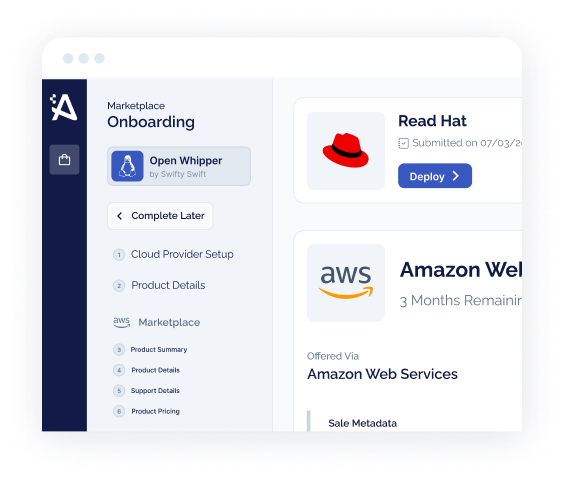



- The AWS Marketplace Management Portal (the AMMP) is where sellers actually run listings, private offers, agreements, and metering — and it behaves differently from the setup docs.
- Four surfaces do almost all the work: Products, Offers, Agreements, and Metering & Reporting. Most avoidable delays start in the first two.
- The expensive mistakes are the quiet ones: a mis-set pricing dimension, a metering call that silently fails, a disbursement finance can’t reconcile.
- A 30-minute pass through the pre-launch checklist at the end catches the errors that otherwise surface weeks later as missing revenue.
Your product is approved, the listing is live, and the first customer just accepted a private offer. Then the AMMP shows an agreement with no matching metering record, and finance asks why the disbursement is $0. This is the part of AWS Marketplace nobody demos — the Management Portal, where the day-to-day actually happens. Here is how its four surfaces behave, where teams get stuck, and the checks that keep a live listing from quietly leaking revenue.
What the AMMP actually is
The AWS Marketplace Management Portal — everyone shortens it to the AMMP — is the seller-side console for everything that happens after your product exists. Getting a product approved and listed on AWS Marketplace is a one-time event. Operating it is not. Every private offer you extend, every usage record you meter, every agreement a buyer signs, and every disbursement AWS pays out flows through this one portal. If you sell through Marketplace, someone on your team lives here.
The trap is treating the AMMP like a set-it-and-forget-it listing tool. It is closer to a lightweight billing and contracts system that happens to wear a listing console’s clothing. Understanding its four surfaces — and how they hand off to each other — is the difference between a listing that generates clean revenue and one that generates support tickets.
Products
Your listing itself: pricing model (SaaS Contract, Contract with usage, or Pay-As-You-Go), dimensions, descriptions, and versions. Changes here are reviewed before they go live.
Offers
Public and private offers, including multi-year terms, custom pricing, and CPPO channel offers. Where most day-to-day selling motion actually lives.
Agreements
The signed record when a buyer accepts an offer. This is your source of truth for who bought what, on what terms, and when it renews.
Metering & Reporting
Usage records, disbursement reports, and the seller reports that reconcile what AWS collected against what it pays you. The surface finance cares about most.
Where teams get stuck — and the fix
Almost every AMMP problem we see follows the same shape: something looks fine in the portal, but a downstream number is wrong. Here are the three that recur, in symptom → cause → fix form.
An agreement shows up under Agreements, but nothing lands in Metering. Nine times out of ten the cause is a usage-based dimension that was never wired to a metering call — or one wired to a dimension key that doesn’t match the listing. AWS won’t warn you; it simply meters nothing. Fix: before launch, send a test metering record against every usage dimension and confirm it appears in the seller report.
The second recurring trap is the pricing model. A SaaS Contract bills a fixed committed amount up front; a Contract with usage adds metered overage on top; Pay-As-You-Go meters everything. Teams routinely pick the wrong one, discover it after a customer signs, and then can’t change it without a new agreement. The AMMP makes the choice look reversible in the Products view. In practice, once an agreement exists against a dimension, you are living with that structure for the life of the contract.
The third is subtler: usage-based metering that works in testing but drifts in production because the metering job runs on your infrastructure, not AWS’s. If your meter emitter goes down for a day, that day’s usage is gone — AWS meters what it receives, not what it should have received. There is no backfill for missed hourly records beyond a short window.
Consider a mid-market observability ISV with two AWS listings and a Contract-with-usage tier. They close their first private offer, book the committed portion, and move on — but the overage dimension was never wired to a metering call. For three months, AWS meters nothing against it. When the annual true-up lands, usage revenue comes in at a fraction of forecast, and none of the un-metered months can be recovered. Nothing in the AMMP ever flagged it; the listing looked healthy the entire time.
The AMMP will never tell you that you are leaving money on the table. It faithfully processes exactly what you configured — including the mistakes.
Metering and disbursement: the part that bites
Disbursement is where the AMMP stops feeling like a listing tool and starts feeling like an accounting system you didn’t staff for. AWS collects from the buyer, holds funds, deducts its listing fee, and disburses to you on its own schedule — typically after the buyer pays and a disbursement window clears. The seller reports that reconcile all of this are downloadable from the portal, but reading them correctly is a skill, not a given.
This is where the Operations Tax shows up — the hidden, recurring cost of running marketplace mechanics by hand. Every hour spent reconciling a disbursement report against your own billing system, chasing a metering discrepancy, or rebuilding a private offer that expired is time that produces no product and closes no deals. It doesn’t appear on any invoice, which is exactly why it goes unmanaged.
The exact hours vary by team, but the shape is consistent. A rough monthly breakdown for a single-cloud seller running the AMMP by hand tends to look like this:
The point is not the exact hours — it is that the work is recurring, invisible, and scales with every new offer and every new cloud. An AMMP that one person “just handles” is a single point of failure. When that person is on vacation, private offers wait and metering discrepancies pile up.
Export the seller disbursement report monthly and reconcile it against your own billing system on a fixed cadence — not when finance asks. The discrepancies you find in month one are cheap to fix; the ones you find at year-end audit are not. Common culprits are covered in our AWS Marketplace listing mistakes guide.
A pre-launch AMMP checklist
Before you flip a listing live — or accept your first private offer against a new dimension — walk this list. It takes about half an hour and prevents the failures above.
- Confirm the pricing model (SaaS Contract vs Contract-with-usage vs PAYG) matches how you actually intend to bill
- Send a test metering record against every usage dimension and confirm it appears in the seller report
- Verify each dimension key in your metering code exactly matches the key in the Products view
- Create and preview a private offer end to end — including expiry date and payment schedule — before a real buyer needs one
- Confirm who owns disbursement reconciliation and on what cadence, and make sure a second person can do it
- Download one seller report now and read it, so it isn’t unfamiliar the day revenue depends on it
None of this is exotic. It is the difference between a Marketplace channel that runs quietly in the background and one that generates a fire drill every time a customer transacts. If you want a runnable version of this, the marketplace listing checklist tool covers the listing side end to end.
The AMMP is manageable by hand — until it isn’t.
Automatum runs the operational layer on top of the AWS Marketplace Management Portal — private offers, metering, agreements, and disbursement reconciliation — across AWS, Azure, and GCP, so a live listing doesn’t depend on one person remembering to check the seller report. See how it fits your stack on the platform overview.
See Automatum in Action →Frequently Asked Questions
Common questions about the AWS Marketplace Management Portal.
What is the AWS Marketplace Management Portal (AMMP)?
The AMMP is the seller-side console for AWS Marketplace. It is where ISVs manage their product listing, create public and private offers, view signed agreements, submit usage metering records, and download disbursement and seller reports.
Why does an accepted offer show no marketplace revenue?
Usually a metering gap. An agreement can exist under Agreements while nothing is metered because a usage dimension was never wired to a metering call, or the dimension key in your code does not match the listing. AWS meters only what it receives, so the fix is to test every dimension before launch.
Can I change my pricing model after a buyer signs?
Not on an existing agreement. Once a buyer accepts an offer against a dimension structure, that structure is fixed for the life of that contract. Changing the model requires a new offer and a new agreement, which is why choosing SaaS Contract vs Contract-with-usage vs Pay-As-You-Go correctly before launch matters.
How do disbursements work in the AMMP?
AWS collects from the buyer, deducts its listing fee, and disburses to the seller on a set schedule after the buyer pays and a disbursement window clears. The AMMP provides seller and disbursement reports to reconcile what AWS collected against what it pays out; reconciling them on a fixed monthly cadence prevents year-end surprises.
Keep building your AWS Marketplace motion
Guides on listing, metering, offers, and the mistakes to avoid.